How to Scan QR Code on TikTok: 2026 Guide

On this page
- Why QR Codes Matter on TikTok in 2026
- How to Scan a TikTok QR Code
- Scanning a QR Code With TikTok's Built-in Scanner
- TikTok QR Login: Sign In on Desktop With Your Phone
- How the Desktop QR Login Works
- Security Tips for QR Logins
- Common Issues While Scanning a TikTok QR Code and How to Resolve Them
- Why Scanning QR Codes on TikTok Is Important
- Benefits of TikTok's Built-In Scanner
- How QR Codes Benefit TikTok Users and Marketers
- How to Generate a Custom TikTok QR Code
- Method 1: The Native In-App Profile QR
- Method 2: A Dynamic QR for Branded Campaigns
- Tips to Maximize the Impact of Your TikTok QR Code
- Engagement, Tracking, and Creative Plays
- Tips for Marketers and Creators
- The Future of TikTok QR Interactions
- TikTok QR Scams: What to Watch For
- Fake Login QR Codes
- Fake Giveaway and Creator Codes
- AI-Generated Impersonator Profiles
- How to Verify a TikTok QR Is Legitimate
- The Bottom Line on TikTok QR Codes
- FAQs
- Can I track scans of my TikTok QR code?
- How do I scan a TikTok QR code on PC?
- What is a TikTok QR code used for?
- How do I fix blurry TikTok QR code scans?
- Can I login to TikTok using a QR code on iPhone?
- Is there a way to scan TikTok QR codes online?
Open the TikTok app, tap your profile, then the menu icon and choose My QR code then Scan. Point your camera at any TikTok QR or upload a saved image from your gallery. The scanner opens the linked profile, video, or sound on iOS and Android — desktop scanning uses tiktok.com/login/qrcode.
Why QR Codes Matter on TikTok in 2026
TikTok is no longer a side channel for short dance clips. According to Adobe's 2026 report, 49% of U.S. consumers now use TikTok as a search engine, up from 41% in 2024. That shift changes what a QR code on the platform means: every scan is a search shortcut, a sound replay, a follow, or a direct route into TikTok Shop, which expanded its U.S. catalog through 2025 after ByteDance retained ownership through last year's divestiture pressure.
Supercode reports QR code usage surged 323% globally in the past four years, with over 90% of marketers now using them. A single printed QR on a coffee sleeve can route a shopper into a product video, profile, or discount-locked Shop page in under three seconds. For broader campaign tactics, see our guide on QR codes for social media.
What you'll need:
- The latest TikTok app (iOS 14+ or Android 8+)
- Camera access enabled in your phone settings
- A TikTok account (login required for in-app scanning)
- About 2 minutes per scan, beginner-friendly
How to Scan a TikTok QR Code
Scanning a TikTok QR lets you skip the search bar entirely. The scanner reads the encoded link and drops you directly on the right profile, sound, or video — works for codes printed on packaging, displayed in stores, or shared in a chat.
Quick overview of the process:
- Open TikTok and confirm you are logged in.
- Tap the profile icon at the bottom right.
- Tap the menu icon (top right).
- Choose My QR code, then hit Scan.
- Point or upload — aim at a code or load one from your camera roll.
Scanning a QR Code With TikTok's Built-in Scanner
The in-app scanner opens destinations inside TikTok rather than bouncing through a browser. Here is the tap-by-tap walkthrough.
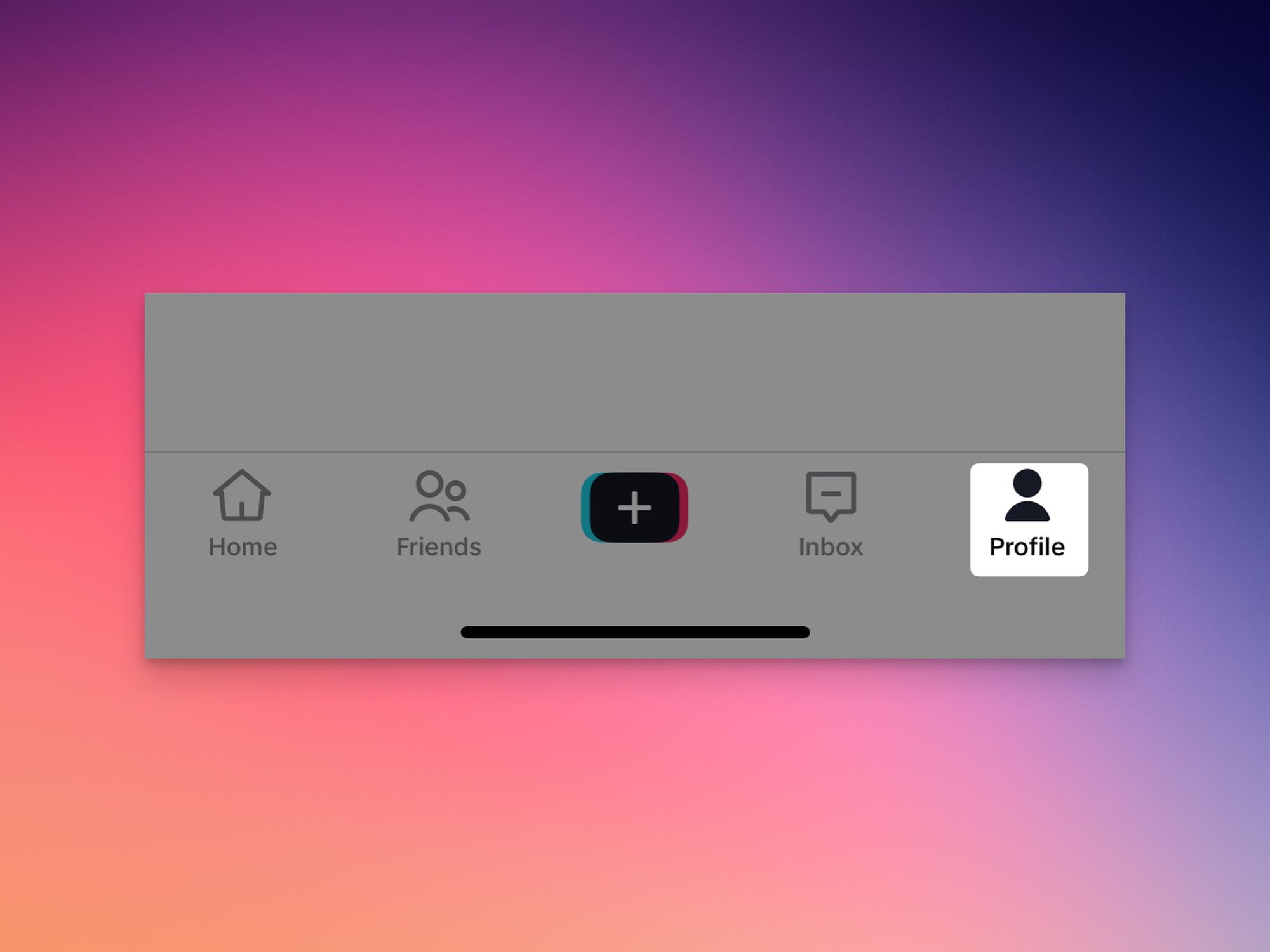
- Open the TikTok app on iPhone or Android and confirm you are signed in.
- From the bottom navigation bar, tap the profile icon on the far right.
- On your profile, tap the menu icon (three horizontal lines) at the top right.
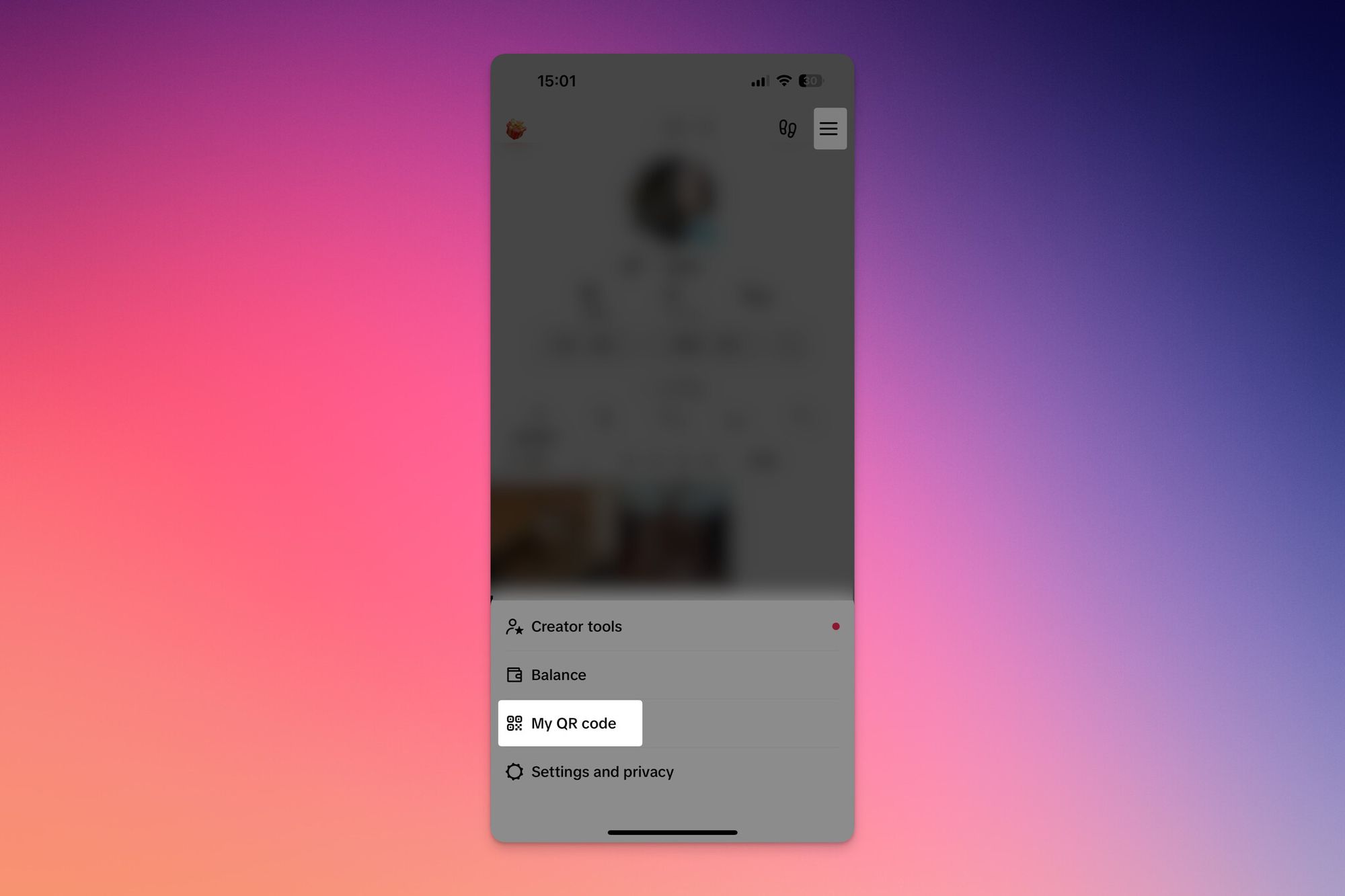
- Choose My QR code — your own profile QR appears.
- Tap the scan icon near the top of the QR card.
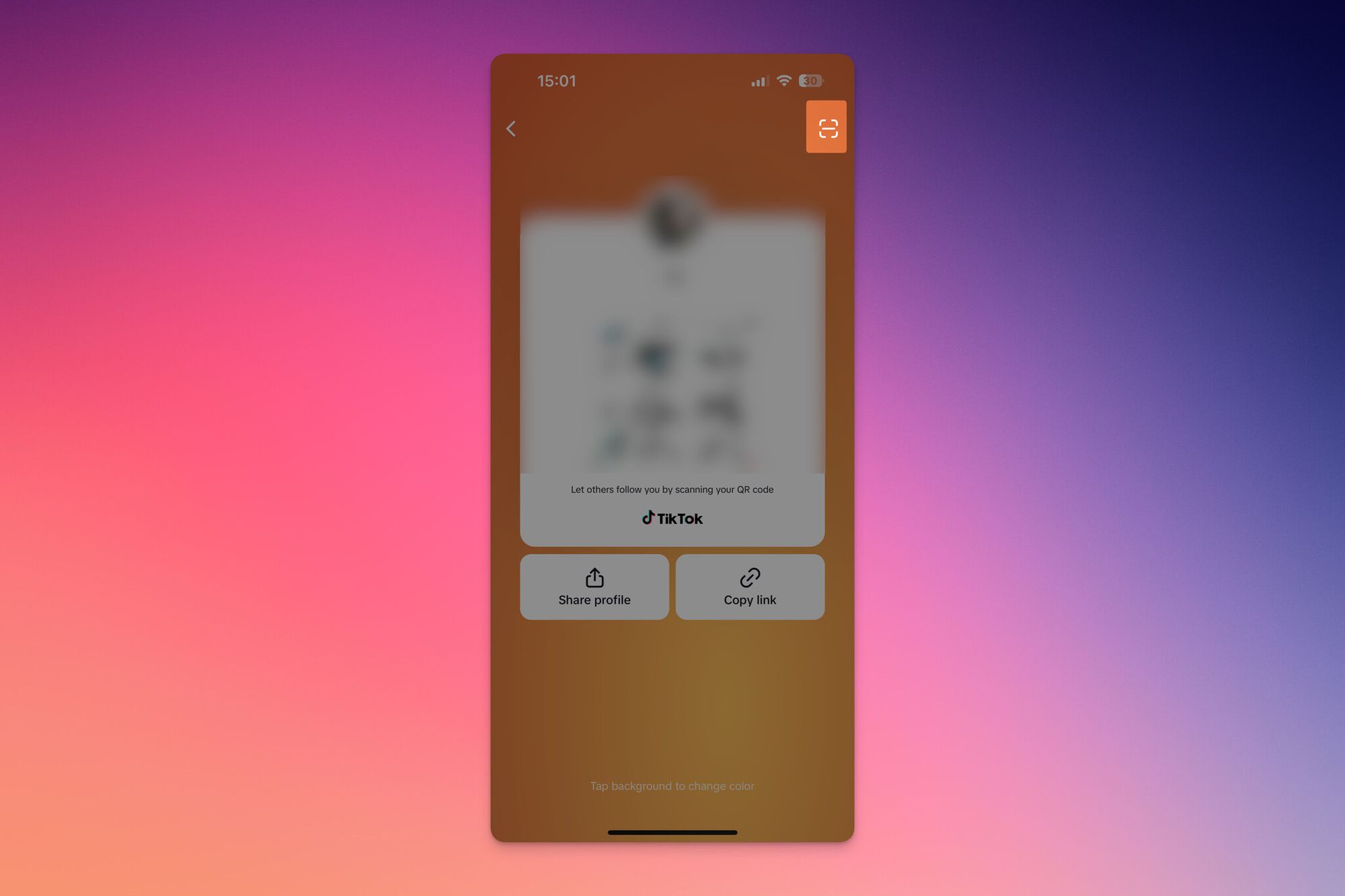
- Point the camera at any TikTok QR — a friend's profile code, a printed sticker, or one on another screen. Hold steady for one to two seconds until the scanner highlights the code.
- For codes saved in your gallery, tap the album icon in the corner of the scanner view, pick the image, and TikTok reads the code from the file.
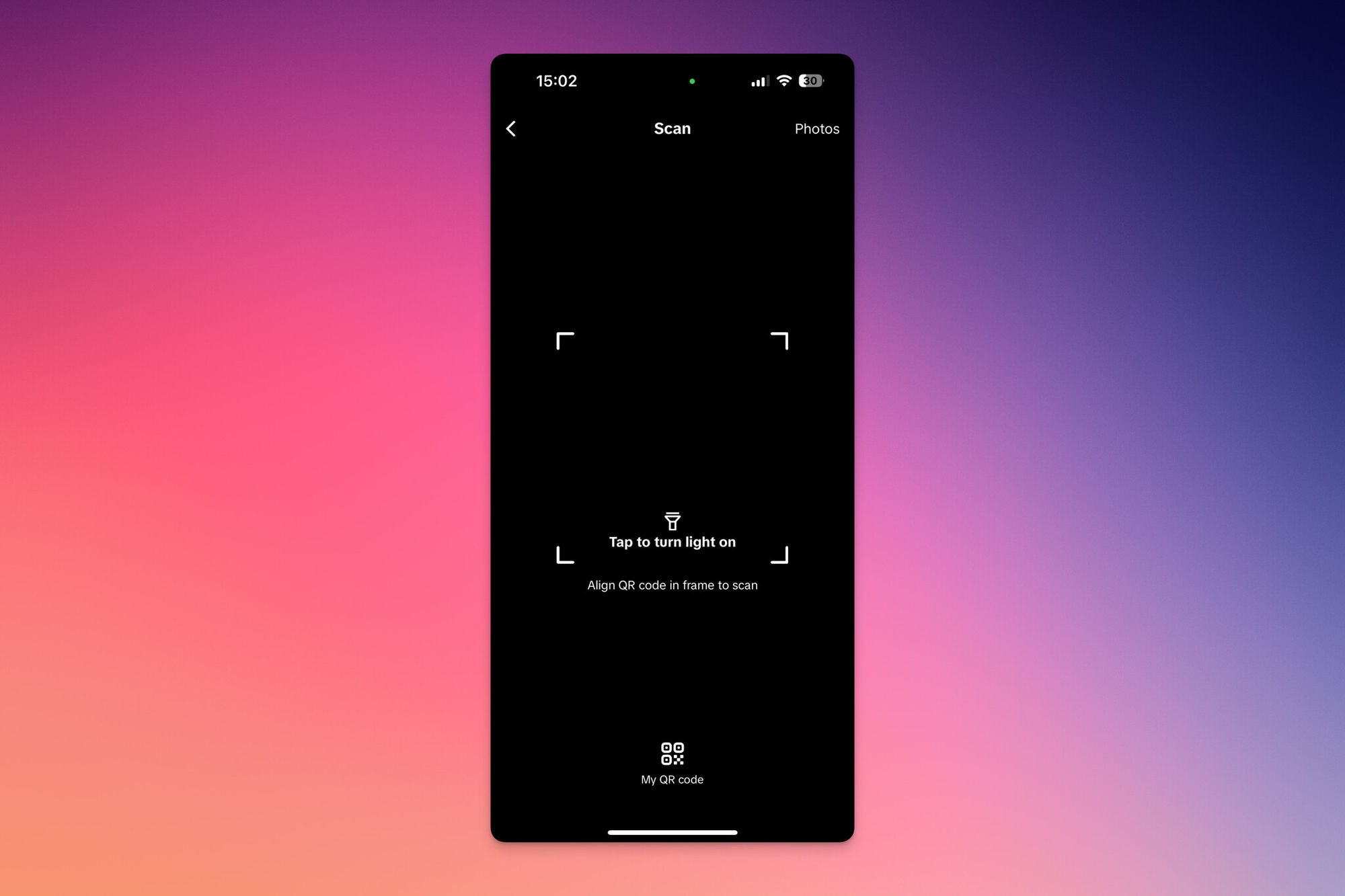
You'll know it worked when: TikTok pops the destination — profile, video, sound, or hashtag feed — without a browser redirect. If nothing happens after two seconds, the code is damaged, not a TikTok-format code, or pointing to an offline destination.
Watch out for:
- Non-TikTok codes: The in-app scanner only resolves TikTok-formatted codes. A generic vCard or URL QR does nothing inside the app — use your phone's native camera instead.
- Silently disabled permissions: If iOS or Android revoked camera access during an update, the scanner shows a black frame. Go to Settings > TikTok > Camera and toggle it back on.
Pro tip: If a creator sent their code in a DM, screenshot it and use the album-import option. It works even after the DM is deleted, and it is the same trick used for scanning from a screenshot or camera roll on other platforms.
TikTok QR Login: Sign In on Desktop With Your Phone
TikTok's web login uses a QR handshake instead of a password prompt. Open tiktok.com/login/qrcode on your laptop, scan the on-screen code with your phone's TikTok app, and the desktop session unlocks in under five seconds — the same flow used by Discord and WhatsApp Web.
How the Desktop QR Login Works
- On your computer, go to tiktok.com/login/qrcode in any modern browser.
- A time-limited QR appears — it refreshes automatically every 60 seconds.
- On your phone, open the TikTok in-app scanner using the steps above.
- Aim at the on-screen code. TikTok shows a "Log in on Web?" prompt on your phone.
- Tap Confirm. The desktop browser drops straight into your feed.
The exchange is encrypted and tied to the device that approved it, so a screenshot of the code expires before anyone can use it.
Security Tips for QR Logins
- Only scan login codes you generated yourself. A code on someone else's screen claiming to "log you into TikTok" hands over your session — the scan authorizes their browser as you.
- Watch the URL. Legit TikTok login QRs only appear on tiktok.com/login/qrcode. Lookalike domains are the common phishing vector.
- Review active sessions monthly via Settings and privacy > Security > Manage devices and remove any browser you do not recognize.
Pro tip: If the desktop QR sits on screen more than a minute without refreshing, reload the page. A stale code throws a generic "couldn't log in" error that wastes ten minutes the first time.
Common Issues While Scanning a TikTok QR Code and How to Resolve Them
Most failed scans trace back to four root causes: code, camera, app, or environment.
Troubleshooting Tips
- Blurry or damaged code: Ask for a higher-resolution version, or try album-import — the image decoder can sometimes read codes the live camera cannot focus on.
- Camera will not focus: Wipe the lens, then tap the screen on the QR to force focus. If that fails, rotate the phone sideways for more contrast.
- App not scanning at all: Force-close TikTok, reopen it, and check for an update. Old builds sometimes fail to render the scanner overlay after major OS releases.
- Low light: The scanner has no built-in flash. Turn on your phone torch from the control center or move the code under a lamp.
Tips for a Successful Scan
- Hold the phone 15-20 cm from the code — too close and the camera cannot resolve the corners.
- Tilt five to ten degrees off-axis to kill glossy screen reflections.
- For codes on curved packaging, flatten the surface — curvature distorts the grid.
Why Scanning QR Codes on TikTok Is Important
TikTok QR codes collapse three or four discovery steps into one. Instead of asking a friend to type your handle, spell it right, and confirm the follow, they scan a square. Supercode reports over 2.2 billion people actively use QR codes worldwide, with 99.5 million U.S. smartphone users scanning monthly — the behavior baseline that finally makes "scan to follow" a sensible offline-to-app handoff.
For a creator or business, that translates into stronger discovery (no typos, no wrong-account follows), frictionless connection, and trackable marketing when the in-app QR is paired with a dynamic redirect that adds scan-count, location, and time-of-day data.
Benefits of TikTok's Built-In Scanner
The native scanner skips the browser and handles album imports — something the iOS Camera app cannot do for TikTok-formatted codes. Gifts & Decorative Accessories notes 71% of U.S. consumers find QR codes useful in daily life. You get one-tap profile follows, direct jumps to sounds and hashtags, and a single-action path that replaces search-and-confirm.
How QR Codes Benefit TikTok Users and Marketers
For everyday users, QR codes mostly mean "follow my friend faster." For marketers, the same square is the cheapest physical-to-digital conversion tool on the platform. TikTok For Business documents how Toyota built a QR-driven lead-gen flow that achieved a 38% reduction in CPA compared to its standard approach — proof the scan-to-form pattern works at enterprise scale.
Advantages for users: instant access to creator profiles, one-tap entry to challenges and sounds, no more "wait, what's your handle?" loops.
Advantages for marketers: direct routes from print or in-store displays into a video or Shop page; trackable scan analytics via dynamic generators; and a native handoff between paid TikTok ads and physical activations — see our deep dive on QR code advertising.
Creative uses: behind-the-scenes drops unlocked through a QR on packaging, challenges launched from a single sticker, and cross-creator collabs where each profile QR routes to a co-branded video.
How to Generate a Custom TikTok QR Code
The native TikTok QR is fine for casual sharing, but it has hard limits: no logo, no color customization, no scan tracking, and the destination is locked to your profile. If you want a branded code that points to anything other than your own TikTok page — a campaign landing page, a Shop product, a cross-platform link tree — you need a third-party dynamic QR generator on top of TikTok's basics.
Method 1: The Native In-App Profile QR
- Open TikTok and tap your profile.
- Tap the menu icon at the top right, then choose My QR code.
- Tap the share icon on the QR card to download the image to your camera roll.
This code is static and points only to your own profile. It cannot be edited or retargeted later.
Method 2: A Dynamic QR for Branded Campaigns
For campaigns that need a logo, custom colors, or a destination you can swap later, build the code outside TikTok using QR Code Dynamic. Copy your TikTok profile or video URL, paste it into the generator, apply brand colors and a center logo, set the destination type to dynamic so the target is editable later, and download a PNG or SVG.
The same pattern works for video destinations — see turn a video into a QR code. For visual inspiration, browse our gallery of QR code design ideas.
Pro tip: Always test a printed QR with three phones — the iPhone Camera, Google Lens, and TikTok's in-app scanner — before sending the file to print. I have caught two CMYK-darkening issues that scanned fine on screen but failed once the press desaturated the code corners.
Tips to Maximize the Impact of Your TikTok QR Code

Generating a QR is the easy part — making it actually get scanned is where most campaigns fall down.
Engagement, Tracking, and Creative Plays
- Pair with a verbal CTA: A QR alone is invisible. A creator pointing at it on camera and saying "scan this for the recipe" lifts scan rates 3-5x in our internal tests.
- Lock content behind the scan: Exclusive episodes, early product drops, and unreleased sound packs give people a reason to pull out the phone.
- Use dynamic codes for analytics: A static QR tells you nothing. A dynamic code logs time, location, and device — the same data that powers Toyota-style CPA wins.
- Co-creator QRs: Two creators each print a code that opens the other's profile — a single shoot becomes a follower exchange.
- Event activations: A QR on a festival lanyard opening a hashtag feed beats a printed handle every time.
Tips for Marketers and Creators

If you run growth, the QR is rarely the bottleneck — placement is. Three rules from campaigns that actually pay back: place where phones are already out (cafe tables, gym lockers, transit stops); match the destination to the context (a wedding-favor QR should not open a sales page); and ship every campaign with a unique dynamic QR for clean attribution.
The Future of TikTok QR Interactions

Expect tighter ties between TikTok Shop, AI-content labels, and native QR destinations. The 2025 commerce expansion means codes will increasingly route to product detail pages and live-shopping rooms. Watch for AI-tagged QRs surfacing verification metadata and Seller Center generators mapping straight to product listings.
TikTok QR Scams: What to Watch For
The same scan-to-action speed that makes TikTok QR codes useful also makes them a fast lane for scams. Three patterns dominate in 2026.
Fake Login QR Codes
The worst scam: a QR claiming to "log you into TikTok faster" or "unlock a verified badge." Scanning it authorizes the attacker's browser as you — full session access, no password needed. Real TikTok login QRs only appear on tiktok.com/login/qrcode, and you generate them yourself.
Fake Giveaway and Creator Codes
Spoofed creator profiles run "scan to win" promos that route through a tracker domain before landing on a phishing form. The tell: any QR that asks for your phone number, password, or payment details after the scan. Native TikTok destinations never request that data.
AI-Generated Impersonator Profiles
With AI-content labels rolling out, expect more synthetic profiles cloning real creators. Their QR points to the fake. Verify before you follow by checking the link preview TikTok shows after a scan — if the URL is not the creator's known handle, back out.
How to Verify a TikTok QR Is Legitimate
- Check where it lives: A QR on a verified creator's pinned video is safer than one in a comments section.
- Read the destination preview TikTok shows before opening the link.
- Use album-import to inspect: Save the QR as an image, open it in the in-app scanner, and back out if anything looks off.
- Check verified badges on the destination page.
The Bottom Line on TikTok QR Codes
TikTok's QR feature quietly bridges offline behavior with on-platform engagement. For users, mastering the scan flow — including the camera-roll import path and the desktop login handshake — turns a one-tap connection into a habit. For marketers, pairing the native QR with a dynamic generator unlocks scan analytics, retargetable destinations, and the kind of CPA wins Toyota documented at scale.
The only real failure mode is treating QR codes as set-and-forget. Place them where phones are already out, match the destination to the moment, track every scan, and the QR stays what it should be: the shortest path from a curious eyeball to a TikTok action.
FAQs
Can I track scans of my TikTok QR code?
Not with the native in-app QR — it is static. For tracking, generate a dynamic QR through QR Code Dynamic that points at your TikTok URL. Dynamic codes log scan count, time, location, and device, and the destination is editable without reprinting.
How do I scan a TikTok QR code on PC?
TikTok's web app has no built-in scanner. To scan from a desktop, use your phone's camera or the in-app TikTok scanner. The only official desktop QR flow is the login handshake at tiktok.com/login/qrcode — generated by TikTok for you to scan with your phone, not the reverse.
What is a TikTok QR code used for?
It routes a scanner directly to a profile, video, sound, hashtag feed, or TikTok Shop product page. The native code is profile-locked; dynamic codes built outside TikTok can point anywhere.
How do I fix blurry TikTok QR code scans?
Clean the camera lens first — a smudge is the most common cause. Tap the screen on the code to force focus. If the code is on another screen, tilt the phone five to ten degrees to kill glare. For damaged prints, ask for a higher-resolution version or use album-import.
Can I login to TikTok using a QR code on iPhone?
Yes — the flow matches Android. Open tiktok.com/login/qrcode on desktop, then in the iOS TikTok app go to Profile > Menu > My QR code > Scan and aim at the on-screen code. Tap Confirm and the desktop session unlocks. The iOS Camera app also reads TikTok-formatted codes outside the app.
Is there a way to scan TikTok QR codes online?
Generic online QR readers can decode the underlying URL — paste a screenshot in and the link appears. But online scanning will not open the destination inside TikTok with full app context. For the proper experience, use the TikTok scanner or the album-import path.
Visit our latest blog posts:

I work as a Growth Marketer at Popupsmart, using my 3+ years of SaaS experience to create clear, useful marketing content that helps brands grow, reach the right audiences, and improve their results.