QR Code for Eventbrite: How to Create One for Your Event


On this page
- What Is an Eventbrite QR Code?
- Why QR codes work so well for events
- Common ways people use an Eventbrite QR code
- How to Create a QR Code for Eventbrite With QR Code Dynamic
- 1. Copy your Eventbrite event page URL
- 2. Open the QR Code Dynamic generator
- 3. Paste your Eventbrite event link
- 4. Customize your QR code design
- 5. Download and share your QR code
- Why Use a Dynamic QR Code for Eventbrite Events?
- Static vs Dynamic QR Codes for Eventbrite
- Why dynamic QR codes are ideal for event marketing
- Ways to Use an Eventbrite QR Code for Your Event
- 1. Event Posters and Flyers
- 2. Social Media Graphics
- 3. Email Invitations and Newsletters
- 4. Presentation Slides and Conferences
- 5. Venue Signage and On-Site Promotion
- Quick overview of where to place your QR code
- Best Practices for Creating an Eventbrite QR Code That Gets Scanned
- 1. Add a Clear Call-to-Action
- 2. Make the QR Code Large Enough
- 3. Use High Contrast Colors
- 4. Place the QR Code Where People Expect It
- 5. Test the QR Code Before Publishing
- Quick checklist for a high-performing Eventbrite QR code
- Common Mistakes When Creating a QR Code for Eventbrite
- 1. Linking to the Wrong Page
- 2. Using a Static QR Code for Events
- 3. Placing the QR Code Too Small
- 4. Not Explaining What the QR Code Does
- 5. Forgetting to Test the QR Code
- Quick mistake checklist
- Final Thoughts: Should You Use a QR Code for Eventbrite?
- Frequently Asked Questions
Organizing an event on Eventbrite is already a smart move, but adding a QR code for Eventbrite can make registration, ticket access, and event promotion much smoother. In my experience working with event pages and digital campaigns, a simple QR code often removes friction between “I’m interested” and “I’m attending.”
In the rest of this guide, I’ll show you how to create a QR code for Eventbrite step by step, how to use it for event promotion and check-ins, and the best practices I’ve learned for increasing registrations.
Let’s get started.
What Is an Eventbrite QR Code?
An Eventbrite QR code is a scannable code that instantly opens your event page, ticket registration page, or event details hosted on Eventbrite.
Instead of typing a long URL or searching for the event manually, attendees simply scan the QR code with their phone camera and land directly on the registration page.
I like QR codes for event promotion because they remove friction. When people see a poster, social media post, or email about your event, the gap between interest and registration becomes just one quick scan.
In simple terms: A QR code for Eventbrite acts like a shortcut that connects the physical and digital worlds.
For example:
Use Case | What Happens After the Scan |
Event poster | Opens the Eventbrite registration page |
Social media graphic | Leads directly to ticket purchase |
Email campaigns | Takes users to the event landing page |
Flyers or brochures | Shows event details and RSVP options |
Instead of asking people to remember the event name or type a link, the QR code immediately sends them to the Eventbrite event page.
Why QR codes work so well for events
From a marketing perspective, I think QR codes work because they align with how people behave at events and in public spaces.
People often discover events through:
- posters
- presentations
- networking sessions
- printed programs
- digital screens
Typing a long link is unlikely in those moments. Scanning a QR code, however, takes two seconds.
Common ways people use an Eventbrite QR code
In practice, I usually see organizers using QR codes for three main things:
1. Event promotion
A QR code links directly to the Eventbrite event page, allowing people to register quickly.
2. Ticket access
Eventbrite tickets themselves often include unique QR codes for entry scanning.
3. Easy registration sharing
Organizers place QR codes on posters, brochures, and social posts so attendees can register instantly.
How to Create a QR Code for Eventbrite With QR Code Dynamic
If you already have your event published on Eventbrite, creating a QR code for Eventbrite with QR Code Dynamic takes only a couple of minutes. I’ve done this many times for event pages and marketing campaigns, and the process is always simple: copy your event link, generate the QR code, and start sharing it.
Here’s the exact step-by-step process I recommend.
1. Copy your Eventbrite event page URL
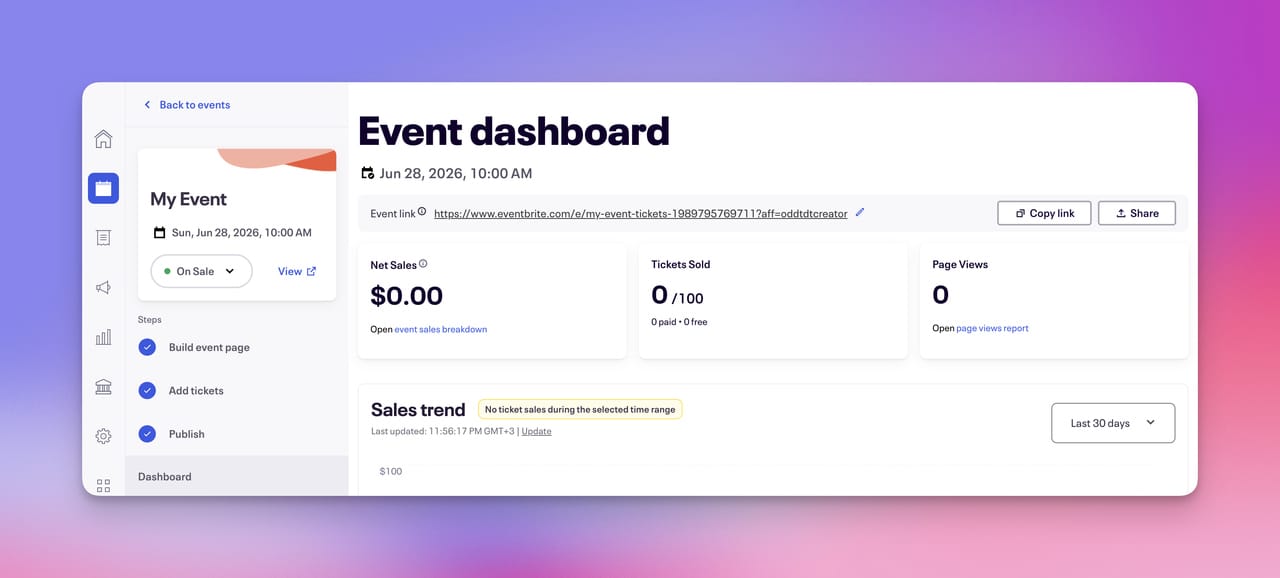
First, go to your event page on Eventbrite.
At the top of the page, you’ll see the public event URL. It usually looks something like this:
Copy this link. This is the page your Eventbrite QR code for registration will open when someone scans it.
2. Open the QR Code Dynamic generator
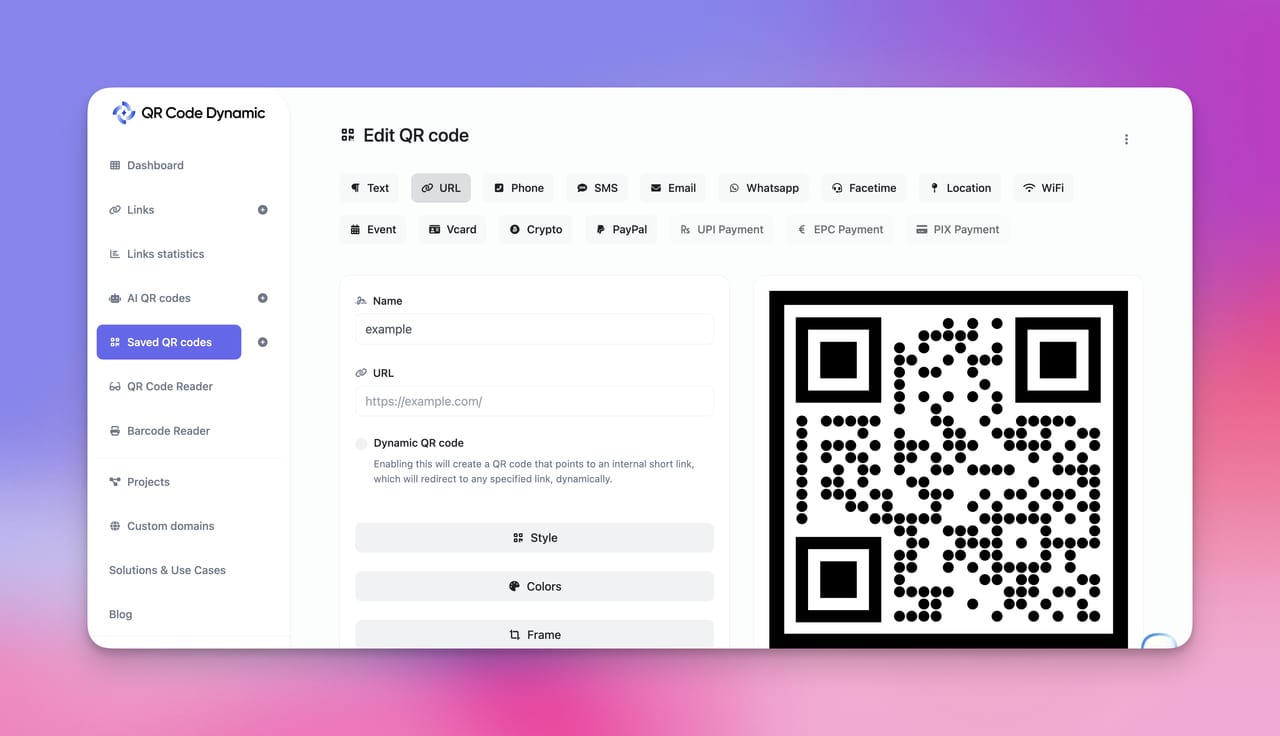
Next, go to the generator page: QR Code Dynamic
Choose the URL QR code option.
A URL QR code is perfect for Eventbrite events, because it simply redirects users to your event registration page.
3. Paste your Eventbrite event link
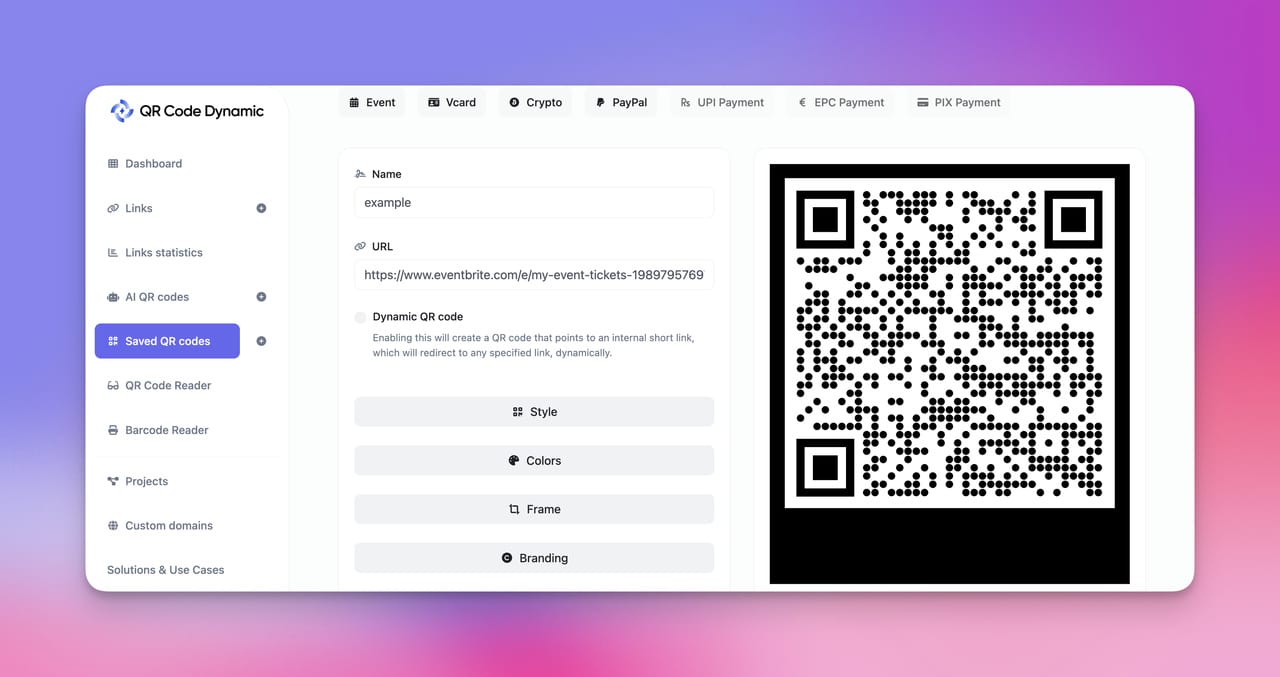
Paste the link you copied from Eventbrite into the generator.
Once you generate the code, you’ll instantly have a QR code for your Eventbrite event.
Most smartphones can scan QR codes directly through the camera. If you’re curious how it works, you can check the official guide from Apple:
How to Scan a QR Code With Your iPhone Camera
Android phones work very similarly.
4. Customize your QR code design
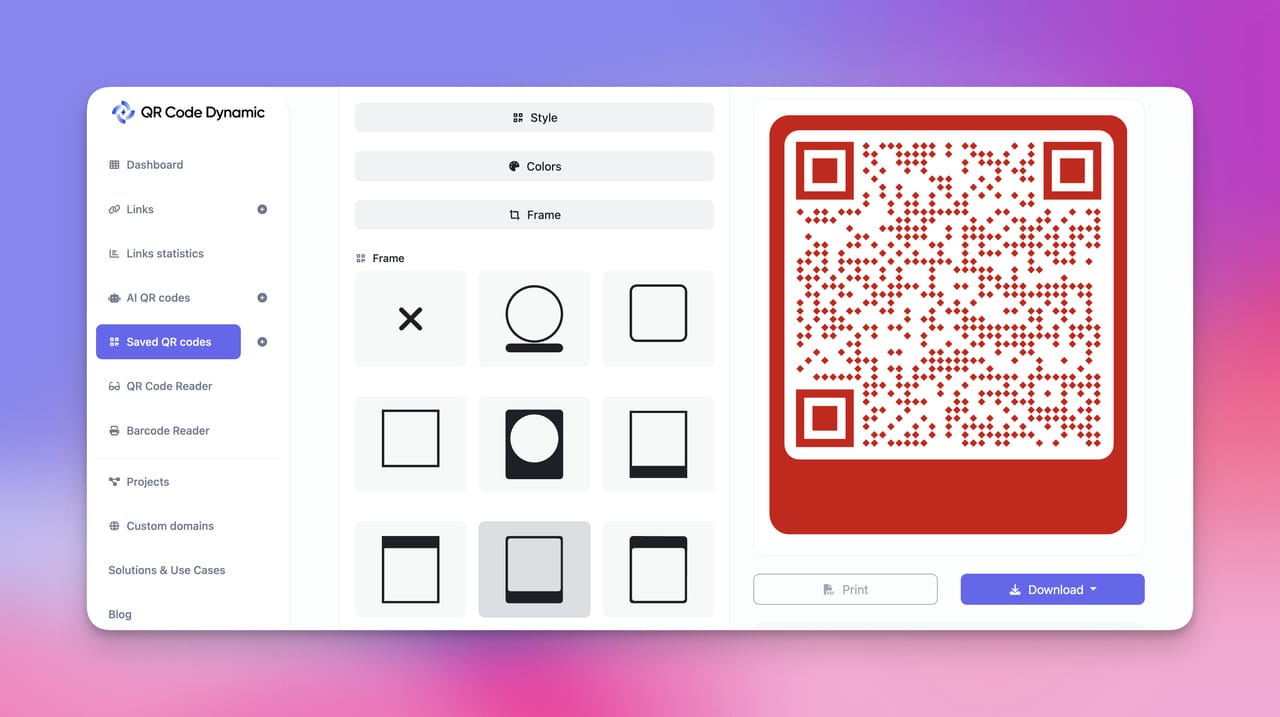
One thing I always suggest is customizing the QR code so it visually fits your event branding.
For example, you can adjust:
- 🎨 QR code colors
- 🖼 add your event logo
- 🧩 frame style
- 📢 call-to-action text like Scan to Register
When the QR code matches your event poster or marketing materials, it tends to attract more scans.
5. Download and share your QR code
Finally, download your Eventbrite QR code and start using it in your event promotion.
Some common places I recommend placing it include:
- event posters
- presentation slides
- social media graphics
- email newsletters
- event invitations
- printed flyers
Here’s the quick overview:
Step | What You Do |
1 | Copy your Eventbrite event link |
2 | Open the QR Code Dynamic generator |
3 | Paste the link |
4 | Customize the design |
5 | Download and share the QR code |
Once someone scans the code, they’re taken directly to your Eventbrite event registration page, making it incredibly easy for people to sign up.
Next, I’ll explain why using a dynamic QR code for Eventbrite events is usually the smarter option, especially if event details change later or you want to track scans.
Why Use a Dynamic QR Code for Eventbrite Events?
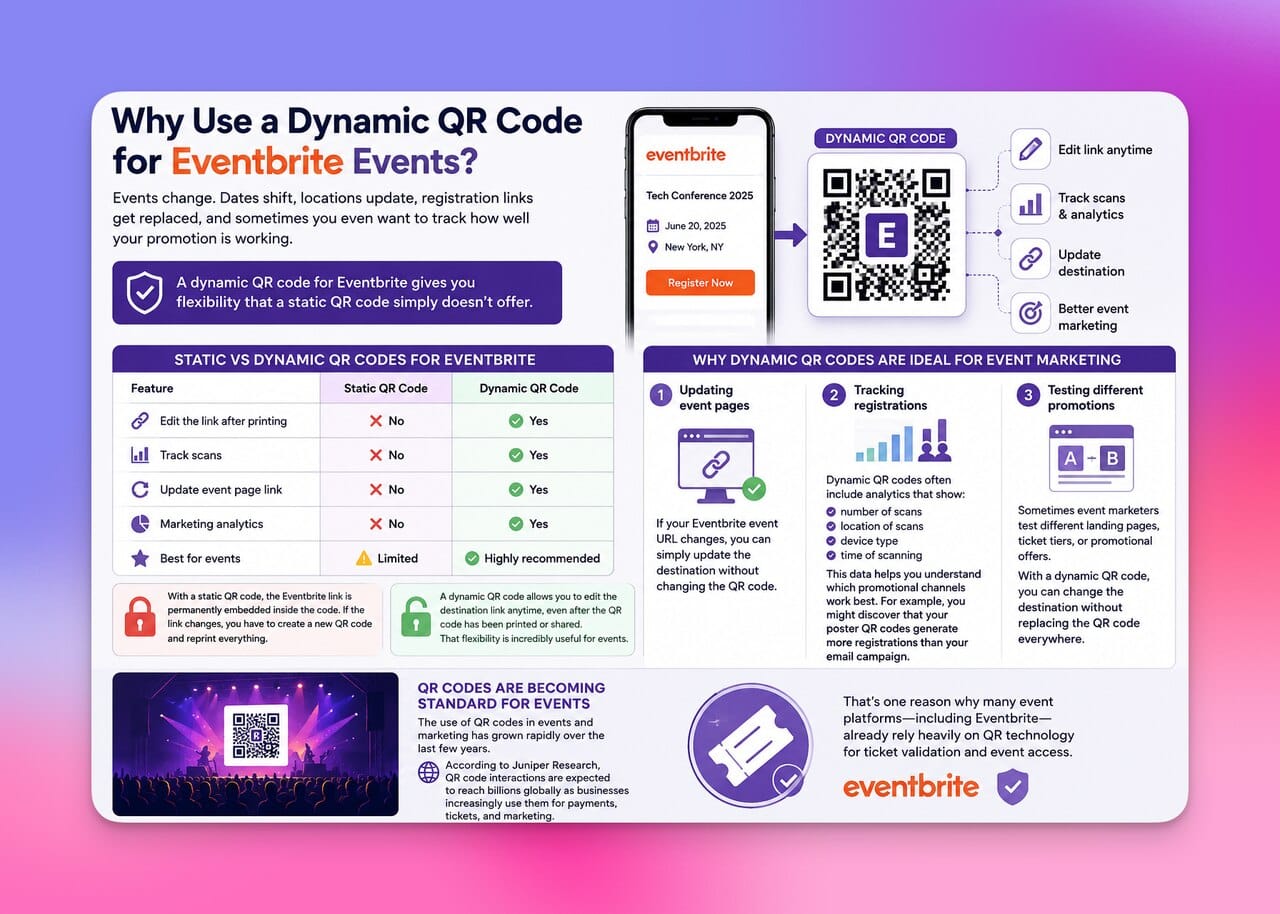
When I create a QR code for Eventbrite, I almost always recommend using a dynamic QR code instead of a static one.
Why? Because events change. Dates shift, locations update, registration links get replaced, and sometimes you even want to track how well your promotion is working.
A dynamic QR code for Eventbrite gives you flexibility that a static QR code simply doesn’t offer.
Static vs Dynamic QR Codes for Eventbrite
Here’s the difference I usually explain to event organizers:
Feature | Static QR Code | Dynamic QR Code |
Edit the link after printing | ❌ No | ✅ Yes |
Track scans | ❌ No | ✅ Yes |
Update event page link | ❌ No | ✅ Yes |
Marketing analytics | ❌ No | ✅ Yes |
Best for events | ⚠️ Limited | ✅ Highly recommended |
With a static QR code, the Eventbrite link is permanently embedded inside the code. If the link changes, you have to create a new QR code and reprint everything.
A dynamic QR code, on the other hand, allows you to edit the destination link anytime, even after the QR code has been printed or shared.
That flexibility is incredibly useful for events.
Why dynamic QR codes are ideal for event marketing
In my experience working with event campaigns, dynamic QR codes help with things like:
1. Updating event pages
If your Eventbrite event URL changes, you can simply update the destination without changing the QR code.
2. Tracking registrations
Dynamic QR codes often include analytics that show:
- number of scans
- location of scans
- device type
- time of scanning
This data helps you understand which promotional channels work best.
For example, you might discover that your poster QR codes generate more registrations than your email campaign.
3. Testing different promotions
Sometimes event marketers test different landing pages, ticket tiers, or promotional offers.
With a dynamic QR code, you can change the destination without replacing the QR code everywhere.
QR codes are becoming standard for events. The use of QR codes in events and marketing has grown rapidly over the last few years. That’s one reason why many event platforms, including Eventbrite, already rely heavily on QR technology for ticket validation and event access.
Ways to Use an Eventbrite QR Code for Your Event
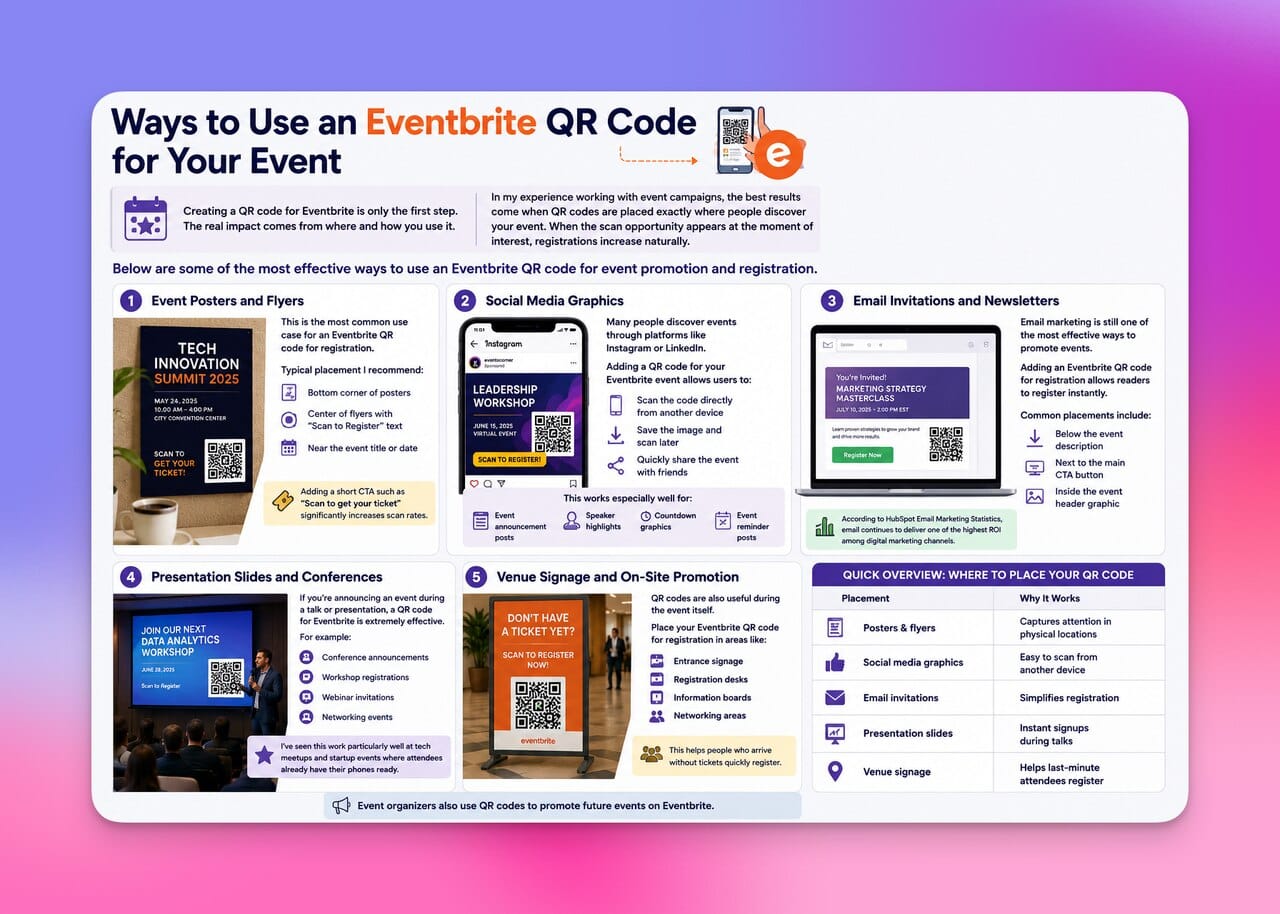
Creating a QR code for Eventbrite is only the first step. The real impact comes from where and how you use it.
In my experience working with event campaigns, the best results come when QR codes are placed exactly where people discover your event. When the scan opportunity appears at the moment of interest, registrations increase naturally.
Below are some of the most effective ways to use an Eventbrite QR code for event promotion and registration.
1. Event Posters and Flyers
This is probably the most common use case for an Eventbrite QR code for registration.
When someone sees your event poster in a café, coworking space, university campus, or conference hall, they don’t want to type a long link. They want instant access.
A QR code solves that problem.
Typical placement I recommend:
- bottom corner of posters
- center of flyers with “Scan to Register” text
- near the event title or date
Adding a short CTA such as “Scan to get your ticket” significantly increases scan rates.
2. Social Media Graphics
Many people discover events through platforms like Instagram or LinkedIn.
Adding a QR code for your Eventbrite event inside a promotional graphic allows users to:
- scan the code directly from another device
- save the image and scan later
- quickly share the event with friends
This works especially well for:
- event announcement posts
- speaker highlights
- countdown graphics
- event reminder posts
3. Email Invitations and Newsletters
Email marketing is still one of the most effective ways to promote events.
According to research from HubSpot Email Marketing Statistics, email continues to deliver one of the highest ROI among digital marketing channels.
Adding an Eventbrite QR code for registration inside your email allows readers to register instantly.
Common placements include:
- below the event description
- next to the main CTA button
- inside the event header graphic
4. Presentation Slides and Conferences
If you’re announcing an event during a talk or presentation, a QR code for Eventbrite is extremely effective.
Instead of telling people to visit a website later, you can display the QR code directly on the slide.
For example:
- conference announcements
- workshop registrations
- webinar invitations
- networking events
I’ve seen this work particularly well at tech meetups and startup events where attendees already have their phones ready.
5. Venue Signage and On-Site Promotion
QR codes are also useful during the event itself.
You can place your Eventbrite QR code for event registration in areas like:
- entrance signage
- registration desks
- information boards
- networking areas
This helps people who arrive without tickets quickly register.
Event organizers also use QR codes to promote future events on Eventbrite.
Quick overview of where to place your QR code
Placement | Why It Works |
Posters & flyers | Captures attention in physical locations |
Social media graphics | Easy to scan from another device |
Email invitations | Simplifies registration |
Presentation slides | Instant signups during talks |
Venue signage | Helps last-minute attendees register |
Best Practices for Creating an Eventbrite QR Code That Gets Scanned
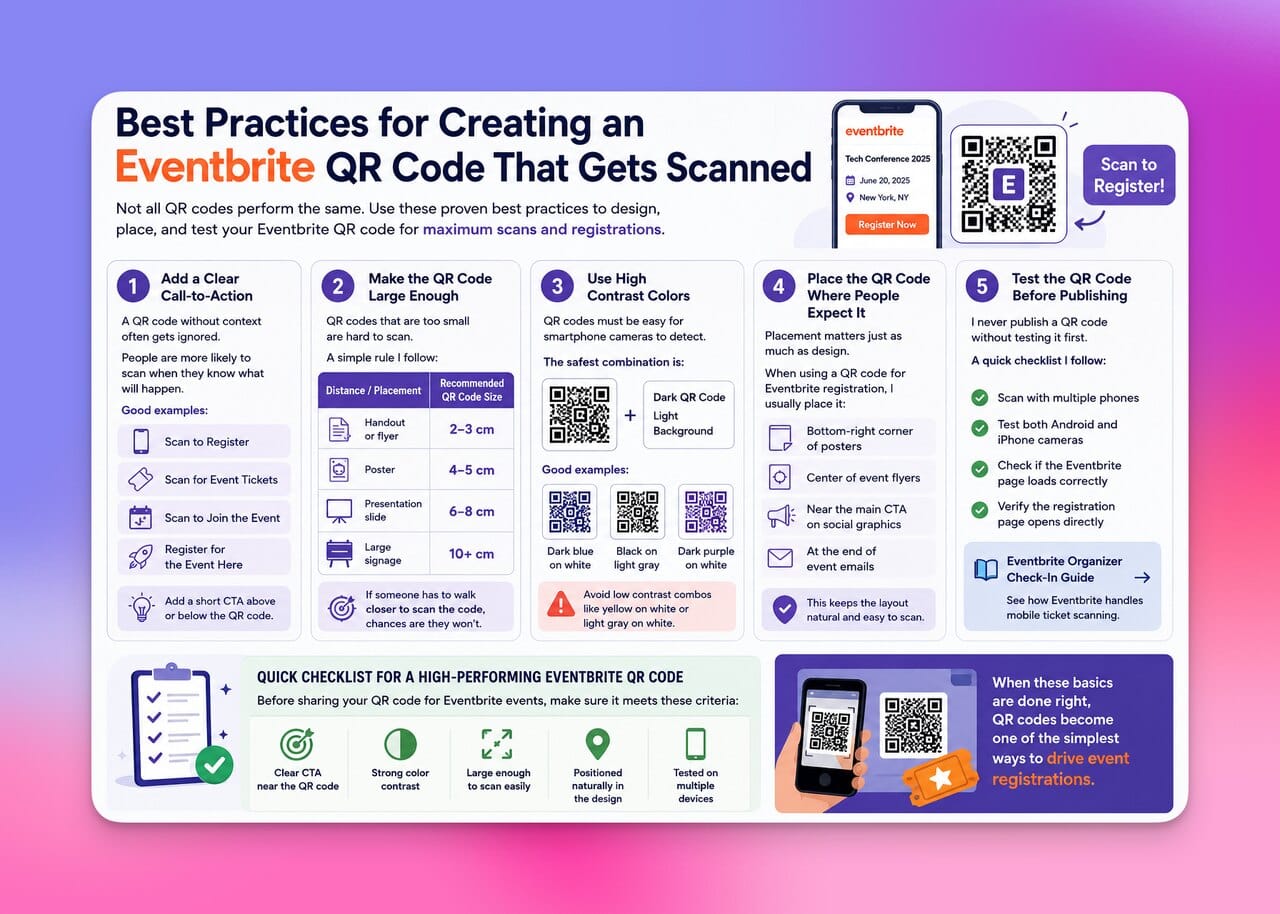
Not all QR codes perform the same. I’ve seen beautifully designed event campaigns fail simply because the QR code for Eventbrite registration was hard to scan or poorly placed.
If you want people to actually scan your Eventbrite QR code for an event, a few small design and placement decisions can make a huge difference.
Here are the best practices I always recommend.
1. Add a Clear Call-to-Action
A QR code without context often gets ignored.
People are much more likely to scan when they see exactly what will happen after scanning.
Good examples include:
- 📱 Scan to Register
- 🎟️ Scan for Event Tickets
- 🗓️ Scan to Join the Event
- 🚀 Register for the Event Here
When I place a QR code for Eventbrite on a poster or graphic, I always add a short CTA above or below the code.
2. Make the QR Code Large Enough
One of the biggest mistakes I see is QR codes that are too small.
A simple rule I follow:
Distance | Recommended QR Code Size |
Handout or flyer | 2–3 cm |
Poster | 4–5 cm |
Presentation slide | 6–8 cm |
Large signage | 10+ cm |
If someone has to walk closer to scan the code, chances are they simply won’t. The size of your qr code matter.
3. Use High Contrast Colors
QR codes must be easy for smartphone cameras to detect.
The safest combination is still:
- dark QR code
- light background
While you can customize colors for branding, make sure there is strong contrast between the code and the background.
For example:
- dark blue on white
- black on light gray
- dark purple on white
Avoid combinations like yellow on white or light gray on white, as they can cause scanning issues.
4. Place the QR Code Where People Expect It
Placement matters just as much as design.
When using a QR code for Eventbrite registration, I usually place it:
- bottom-right corner of posters
- center of event flyers
- near the main CTA on social graphics
- at the end of event emails
This keeps the layout natural and easy to scan.
5. Test the QR Code Before Publishing
I never publish a QR code without testing it first.
A quick checklist I follow:
- scan with multiple phones
- test both Android and iPhone cameras
- check if the Eventbrite page loads correctly
- verify the registration page opens directly
Quick checklist for a high-performing Eventbrite QR code
Before sharing your QR code for Eventbrite events, make sure it meets these criteria:
- ✔ clear CTA near the QR code
- ✔ strong color contrast
- ✔ large enough to scan easily
- ✔ positioned naturally in the design
- ✔ tested on multiple devices
When these basics are done right, QR codes become one of the simplest ways to drive event registrations.
Common Mistakes When Creating a QR Code for Eventbrite
Even though creating a QR code for Eventbrite is simple, I’ve noticed that many organizers make small mistakes that reduce scans or cause registration problems.
The good news is that these mistakes are easy to avoid once you know what to look for.
Here are the most common issues I’ve seen when people create a QR code for Eventbrite events.
1. Linking to the Wrong Page
One mistake I see surprisingly often is linking the QR code to the wrong page.
For example:
- linking to the main Eventbrite homepage
- linking to a general website instead of the event page
- linking to a login page
Your Eventbrite QR code for registration should always direct users to the exact event page where they can register or buy tickets.
Before publishing your QR code, double-check that it opens the correct page.
2. Using a Static QR Code for Events
Events often change.
Maybe the venue changes. Maybe the ticket page updates. Sometimes the event URL itself changes.
If you create a static QR code, the link is permanently fixed. If something changes, the QR code becomes useless.
That’s why I usually recommend dynamic QR codes, which allow you to update the destination link anytime without reprinting your materials.
3. Placing the QR Code Too Small
This happens a lot with posters and printed materials.
If the Eventbrite QR code for an event is too small, people simply won’t bother scanning it.
Common problems include:
- placing the QR code in a crowded corner
- shrinking it to fit the design
- using low-resolution images
Always make sure the QR code is large and clearly visible.
4. Not Explaining What the QR Code Does
Another common mistake is forgetting to tell people why they should scan the QR code.
A QR code alone doesn’t communicate value.
Instead, include short messages like:
- 🎟️ Scan to Get Event Tickets
- 📅 Register for the Event
- 🚀 Join the Event on Eventbrite
This small detail significantly improves scan rates.
5. Forgetting to Test the QR Code
This might be the most avoidable mistake.
Before publishing your QR code for Eventbrite registration, always test it.
I usually test by:
- scanning with multiple phones
- checking Wi-Fi and mobile data
- confirming the Eventbrite event page loads quickly
According to a mobile usage report from Pew Research Center Smartphone Adoption Statistics, smartphones are now the primary internet device for many users, which means most people will access your event page directly from their phone.
If the page loads slowly or incorrectly, registrations may drop.
Quick mistake checklist
Before sharing your Eventbrite QR code for an event, make sure you haven’t made these mistakes:
- ❌ linking to the wrong page
- ❌ using static QR codes for changing events
- ❌ making the QR code too small
- ❌ not adding a CTA
- ❌ forgetting to test the code
Fixing these simple issues can dramatically improve how effective your QR code for Eventbrite registration becomes.
Final Thoughts: Should You Use a QR Code for Eventbrite?
If you’re hosting an event on Eventbrite, adding a QR code for Eventbrite is one of the simplest ways to make registration easier and increase visibility.
In my experience working with event pages and digital campaigns, QR codes remove a lot of unnecessary friction. Instead of asking people to remember a link, search for the event later, or type a long URL, you give them the fastest possible path: scan and register.
Sometimes the smallest tools make the biggest difference. For event promotion, a simple QR code might be the easiest way to bring more people to your Eventbrite event. 🎟️📱
Frequently Asked Questions
1. How do I get a QR code for Eventbrite?
To get a QR code for Eventbrite, you first need the URL of your event page on Eventbrite. Once your event is published, copy the event link and paste it into a QR code generator such as QR Code Dynamic Generator. The generator will instantly create a QR code that directs people to your Eventbrite event page when they scan it, allowing them to view details and register.
2. Does Eventbrite automatically generate QR codes?
Yes, but only for tickets. Eventbrite automatically generates unique QR codes for each attendee ticket, which organizers can scan during event check-in. However, if you want a QR code that promotes the event itself or directs people to the registration page, you typically create that QR code separately using a QR code generator.
3. Can I use a QR code for Eventbrite event registration?
Yes, you can use a QR code that links directly to your event page on Eventbrite. When someone scans the QR code, they are taken straight to the event page where they can read about the event, select tickets, and complete registration. Many organizers use this method in marketing materials to make the registration process faster and easier.
4. What is the best QR code type for Eventbrite events?
In most cases, a dynamic URL QR code is the best option for an Eventbrite event. A dynamic QR code allows you to update the destination link later and monitor scan data without replacing the QR code itself. This flexibility is especially useful if the event details change or if you want to track how people are discovering your event.
5. Where should I place an Eventbrite QR code for better registrations?
The best place to put a QR code for an Eventbrite event is wherever people first encounter information about the event. This could be on posters, flyers, social media graphics, email invitations, or presentation slides. Adding a short instruction such as “Scan to Register” next to the code helps people understand what the QR code does and increases the likelihood that they will scan it.

I work as a Growth Marketer at Popupsmart, using my 3+ years of SaaS experience to create clear, useful marketing content that helps brands grow, reach the right audiences, and improve their results.