How to Make a Venmo QR Code for Easy Transactions


On this page
- What is a Venmo QR Code?
- Why You Need a Venmo QR Code
- How Does the Venmo QR Code Work?
- How to Create Your Venmo QR Code Through the Venmo App
- iPhone (iOS 16+)
- Android (10+)
- Customizing and Sharing Your Venmo QR Code
- Creating Your Venmo QR Code Using a Third-Party Tool
- Step 1: Open the QR Code Dynamic homepage
- Step 2: Pick the URL QR type
- Step 3: Paste your Venmo profile URL
- Step 4: Style the code
- Step 5 and 6: Create and download
- Venmo QR Codes for Business: Tap to Pay
- Set up a business profile first
- Activate Tap to Pay
- The fee math
- Using Your Venmo QR Code in Different Scenarios
- Troubleshooting Common Issues with Venmo QR Codes
- Venmo QR Code Security and Scam Patterns
- Overpay-and-refund
- Fake-payment screenshot
- Wrong-recipient social engineering
- Verify a QR is legitimate
- Purchase protection limits
- Venmo Tap to Pay vs Apple Pay vs Google Pay
- Best Practices for Using Your Venmo QR Code
- The Bottom Line on Venmo QR Codes
- Frequently Asked Questions
- What can someone do with my Venmo QR code?
- Are Venmo QR codes free?
- How do I customize a Venmo QR code for my business?
- Can I use a Venmo QR code for international payments?
- Visit our latest blog posts:
To create a Venmo QR code, open the Venmo app and tap your profile picture — the personal QR appears at the top. Tap it to view, save to camera roll, or share. For business owners, switch to your business profile to access the Tap to Pay QR (2.9% + 9¢ per transaction). Both work without third-party tools.
What is a Venmo QR Code?
What you'll need:
- A Venmo account (personal, business, or both) on iOS 16+ or Android 10+
- The latest version of the Venmo app installed
- About 5 minutes for personal setup, 15 minutes for a Tap to Pay business profile
- Skill level: beginner-friendly
Quick overview of the process:
- Open the app — tap your profile picture in the upper-left corner.
- View your QR — your personal QR sits at the top of the profile sheet.
- Save or share — download to camera roll, copy a link, or text it.
- Switch to business — flip into your business profile if you want Tap to Pay or charge-style QRs.
- Print or display — export as PNG or PDF for signage, packaging, or kiosks.
A Venmo QR code is a scannable image that points to your Venmo profile or a specific charge request. Scanning one with Venmo (or your phone's camera in newer builds) opens the app with the recipient pre-filled. Two flavors exist: a personal QR tied to your @username, and a business QR that doubles as a Tap to Pay receiver.
Behind the image, the code stores a Venmo deep link like venmo://paycharge?txn=pay&recipients=username. Because it's a deep link, Venmo can revoke or rotate it server-side — something a printed routing number can't do.
Why You Need a Venmo QR Code
QR-based payment is no longer a side feature. According to AOL's QR usage report, over 100 million people in the U.S. are expected to scan a QR code in 2026, and Venmo is one of the apps they reach for when splitting checks or tipping. The QR removes the biggest friction in P2P payments: spelling a username on a tiny keyboard.
What a Venmo QR solves:
- Eliminates manual entry — the recipient is locked, the scanner only confirms the amount.
- Cuts misrouted payments, Venmo's biggest support-ticket pattern.
- Works in low-trust settings like yard sales and tip jars.
- Scales to print — one PDF onto signage, packaging, or kiosks.
- Wrapped in a tracked short link via QR Code Dynamic, destinations swap without reprinting.
The QR payment market analysis on Yahoo Finance projects the global QR payment segment will hit $51.58 billion by 2032 — small operators benefit from picking up the habit early.
How Does the Venmo QR Code Work?
A Venmo QR is a URI in a 2D matrix. When scanned, your phone opens the URI and Venmo intercepts it via deep linking.
- Generation happens server-side. Venmo renders the QR from your stable account identifier plus an optional charge payload. The image is generated on demand, so the account binding stays current even if your printed code is months old.
- Scanning follows a standard handshake. Open Venmo, tap the scan icon (top-right on iOS, camera glyph on Android), frame the QR, and the app decodes the URI. If the QR has a preset amount, the Pay screen opens with that amount filled. The scanner picks a funding source and taps Pay.
- Completion uses Venmo's normal rails: P2P from a bank or Venmo balance is free, credit card adds 3%, business charges run 1.9% + 10¢ standard or 2.9% + 9¢ for Tap to Pay (detailed below).
How to Create Your Venmo QR Code Through the Venmo App
Venmo redesigned the navigation in late 2025 — the QR icon used to live on its own tab and now sits inside the profile sheet that opens when you tap your avatar.
iPhone (iOS 16+)
- Tap your profile picture in the upper-left of the home feed.
- Tap the QR at the top of the profile sheet to expand it.
- Hit Save for a PNG to camera roll, or Share via Messages, Mail, or AirDrop.
- To preset a charge, tap Set amount, enter the value, and add a short memo.
Android (10+)
- Tap your profile picture at the top of the home feed.
- Tap the QR icon under your username to expand.
- Use the system share sheet to push the image to Drive, Gmail, or Photos.
- For a preset charge, tap $, enter the value, and select Set Amount.
You'll know it's working when: the QR sheet shows your @username and a "Venmo Me" banner. If you only see a profile photo, update the app from the store first.
Watch out for:
- Screenshotting instead of exporting: screenshots include the status bar and shrink the quiet zone, killing scan reliability under 1.5 inches. Use the in-app Save button.
- Charge amounts persisting: a $25 amount set yesterday will try to charge $25 today. Tap Clear amount before sharing for general use.
Pro tip: Save the personal QR as venmo-personal.png in a pinned Notes file. Pulling up a saved PNG is faster than re-navigating the app when the bartender's waiting.
Customizing and Sharing Your Venmo QR Code
Venmo's native customization is minimal — no logos, no shape changes. Standardized QR design protects scan reliability. Still, you can tune how the code gets shared.
Save formats: PNG for digital, PDF for print, SVG for designer handoff (use a third-party tool — Venmo ships PNG only).
Sharing: personal QRs go through the in-app share sheet (iMessage, WhatsApp, email). Business profiles use Charge → QR code → Venmo me, and Tap to Pay accounts get a "Generate sign" PDF formatted for letter-size print.
Sizing: 4x4 inches on cardstock for a yard sale, 8x8 inches for a storefront window, mounted 3-5 feet off the ground at a kiosk. Phones held at chest height read fastest.
Creating Your Venmo QR Code Using a Third-Party Tool
Venmo's in-app QR is fine for casual use, but it can't be tracked, swapped, or styled to match a brand. A dedicated generator like QR Code Dynamic wraps your Venmo deep link in a trackable short URL.
Step 1: Open the QR Code Dynamic homepage
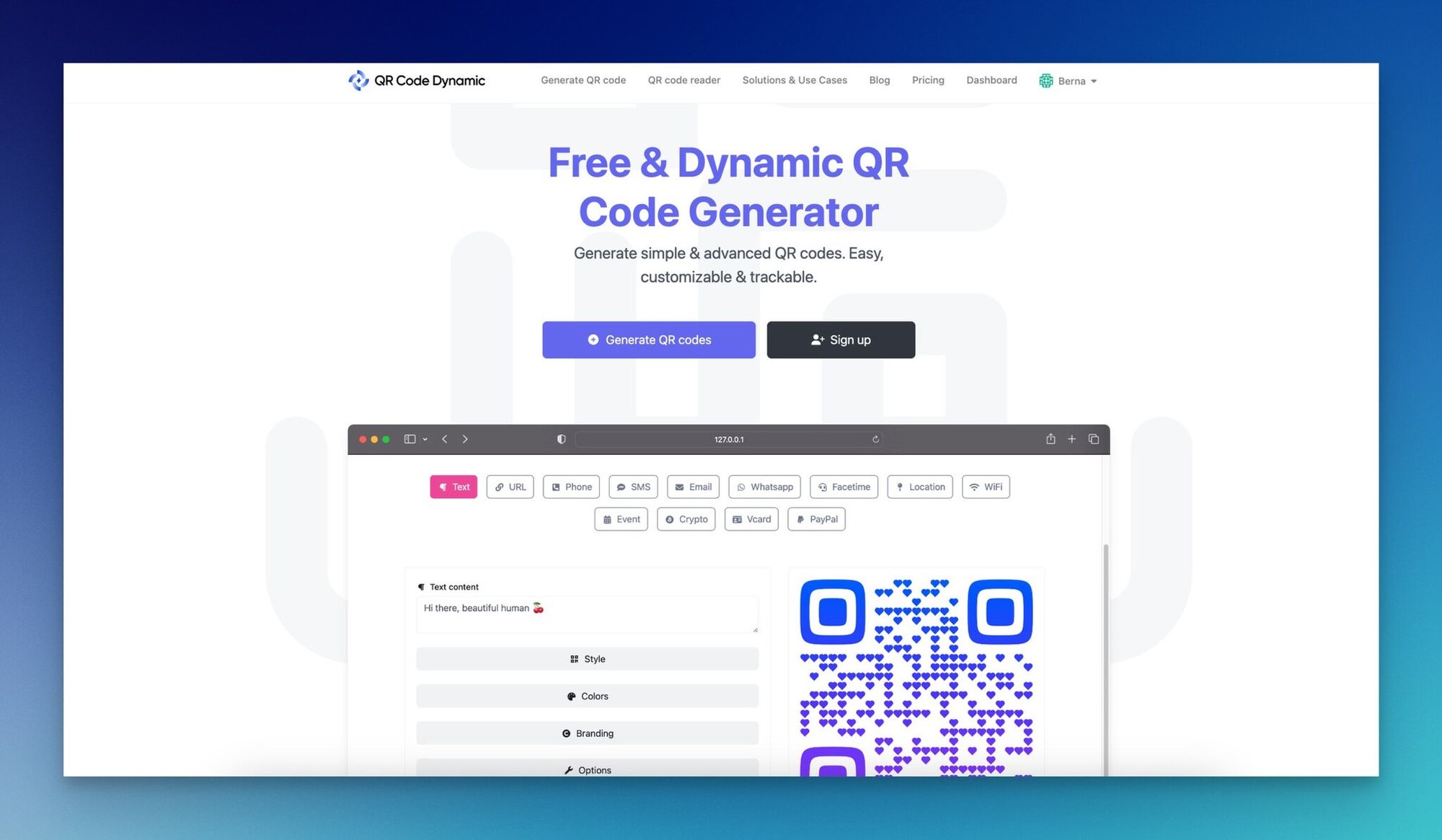
The free tier covers static codes; dynamic codes (changeable destination) sit on a paid tier under $10/month.
Step 2: Pick the URL QR type
From the dashboard, click Generate QR codes, then choose the URL QR code option — Venmo doesn't expose a native QR-builder API.
Step 3: Paste your Venmo profile URL
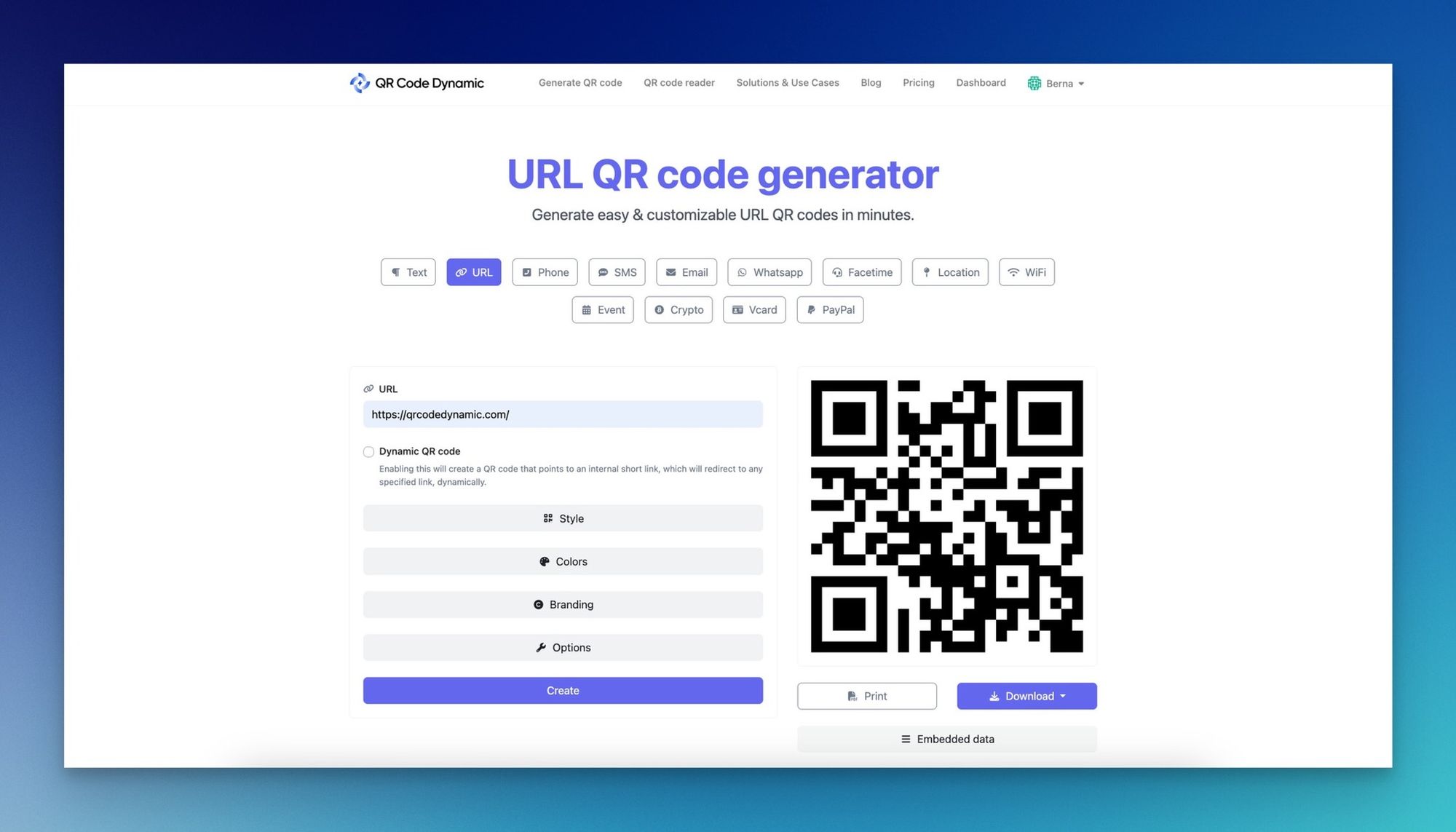
Your Venmo URL follows the format https://venmo.com/u/your-username. Find it by logging into the web app and copying the address bar from your profile. The generated code hands off to the app via deep link when scanned.
Step 4: Style the code
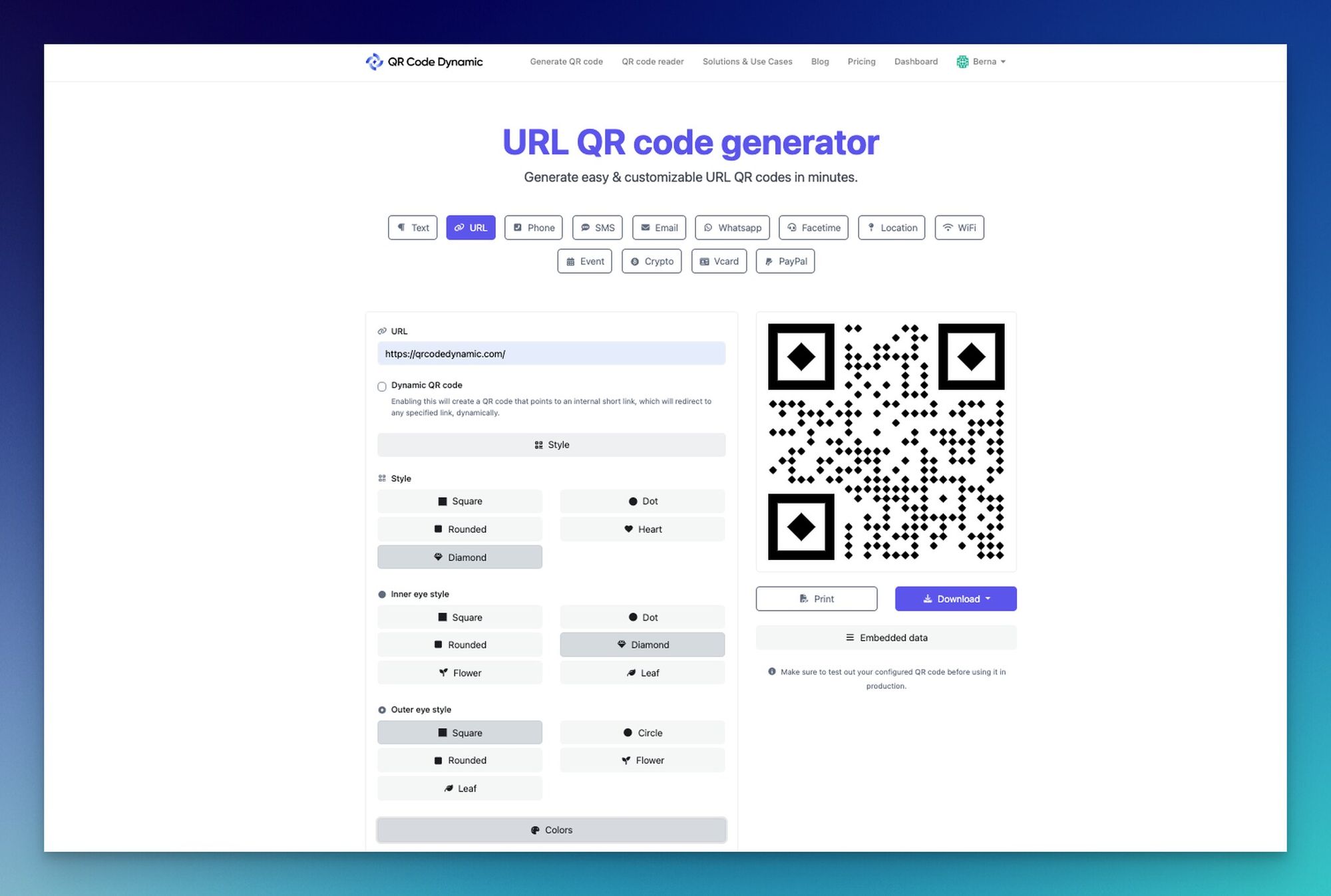
Match foreground color to your brand (skip yellow-on-white). Add a center logo under 25% coverage — the encoder uses error correction to compensate; go higher and scans fail at distance.
Step 5 and 6: Create and download
Hit Create, then Save in PNG, JPG, SVG, or EPS. Test on three phones before scaling the print run.
Pro tip: Test scans on the actual material you'll print on. Glossy stock reflects camera flash and fails at angles; matte cardstock and laminated PDF prints are forgiving in real lighting.
Venmo QR Codes for Business: Tap to Pay
Most guides skip this. Venmo Tap to Pay turned the P2P app into a near-replacement for a Square reader for solo operators. With an iPhone XS or later (or a recent NFC Android), you can accept contactless cards, Apple Pay, and Google Pay through the same business profile that hosts your QR.
Set up a business profile first
- Tap Me, then Add a business profile.
- Provide a legal business name, category, and payout bank. Sole proprietors can use their SSN.
- Wait for verification — usually under 24 hours.
- Switch profiles using the toggle at the top of the home feed.
Activate Tap to Pay
- From the business profile, tap Charge → Tap to Pay (only on supported devices).
- Enter the amount and optional item description.
- Hold the customer's phone, contactless card, or smartwatch within an inch of yours. NFC handshake is silent — a checkmark confirms.
The fee math
According to a Business of Apps Venmo report, Venmo charges a 2.9% business transaction fee, and Tap to Pay lands at 2.9% + 9¢ per contactless transaction. $0 setup, $0 monthly, no hardware. On a $20 sale that's 67¢ — close to Square's 2.6% + 10¢.
| Charge type | Standard fee | Best for |
|---|---|---|
| Personal-to-personal (bank/Venmo balance) | $0 | Splitting bills, friends, family |
| Personal-to-personal (credit card) | 3% of amount | One-off P2P when you need rewards points |
| Business profile QR charge | 1.9% + 10¢ | Online or QR-only stores |
| Tap to Pay (contactless) | 2.9% + 9¢ | In-person, walk-up customers |
Because Tap to Pay accepts Apple Pay, Google Pay, and physical NFC cards through the same flow, you don't need a separate processor for customers who don't use Venmo. One app, every wallet.
Watch out for:
- Same-day deposit fees: instant transfers cost 1.75% (capped). Use free standard ACH unless cash flow demands instant.
- Disputed transactions: Venmo Business has chargeback liability similar to a card processor. Keep app-emailed receipts for at least 90 days.
Using Your Venmo QR Code in Different Scenarios
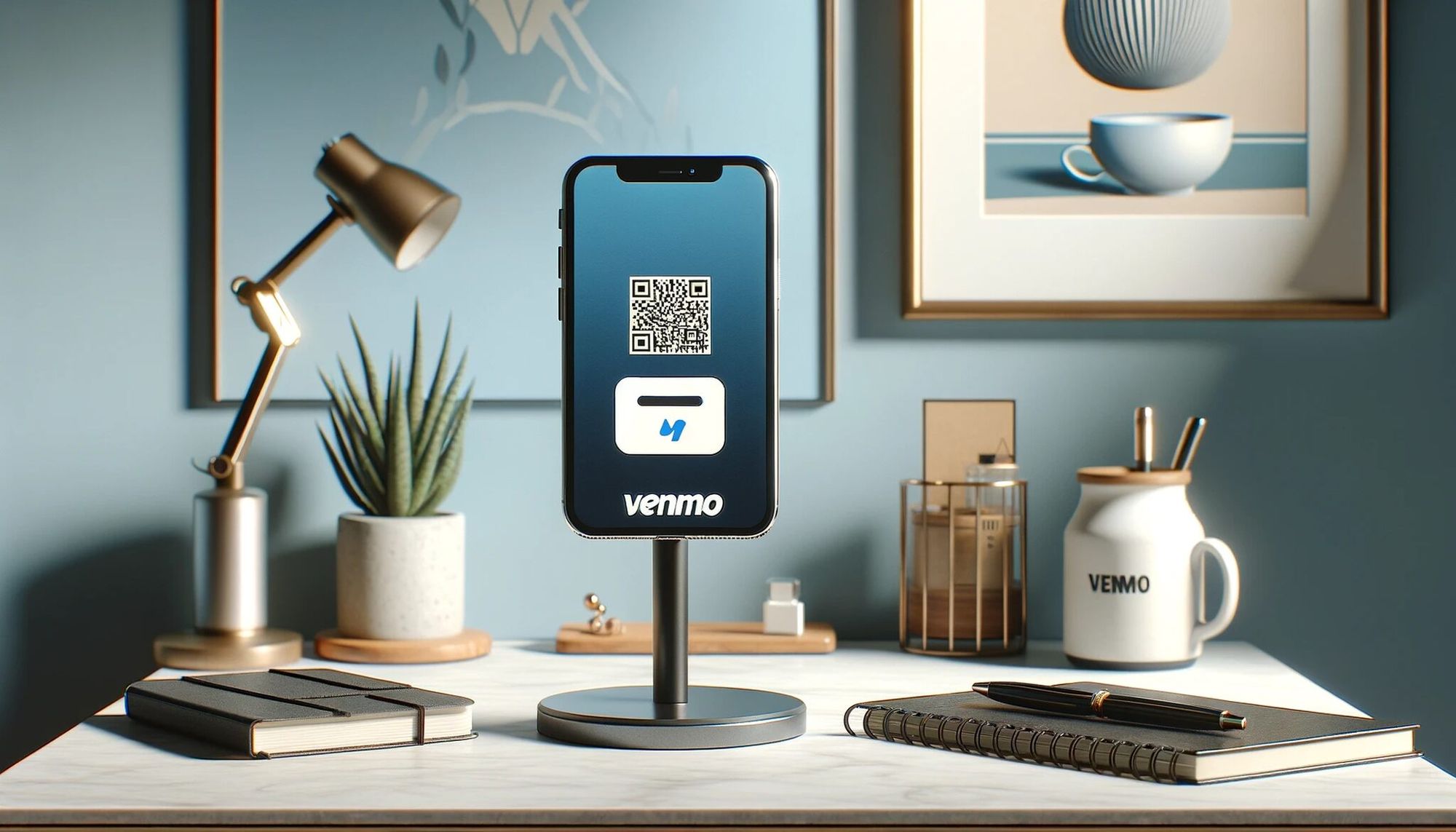
The QR is the same — placement and calls-to-action shift.
In-store and pop-up: print a 4x6 card with the QR centered, business name above, one-line CTA below. Tilt the card 30 degrees on the counter — flat placement creates glare. A clear acrylic stand is enough at events.
Online checkout: some retailers integrate the Venmo button via Braintree (its parent processor). On Shopify or WooCommerce it's a paid plugin. Display a static QR alongside the standard checkout for mobile-only buyers, and pair with Cash App QR codes for broader P2P coverage.
Sending and requesting: tap Scan code and frame their QR. The app fills the recipient; you enter the amount. To request, switch to your QR and let them scan.
Tipping: service workers post personal QRs on lanyards or stickers. Phrase the CTA as "Tip optional, anything appreciated" — vague signage reads off-brand for paid services.
Venmo works only in the U.S. — international workaround in the FAQ below.
Troubleshooting Common Issues with Venmo QR Codes
Most QR failures fall into four buckets.
Camera or app permissions. iPhone: Settings → Privacy & Security → Camera → toggle Venmo on. Android: Settings → Apps → Venmo → Permissions → Camera → Allow. Force-quit after toggling — iOS sometimes caches the old state.
Network. Both ends need internet. A scan that opens to a blank Pay screen usually means the recipient's profile failed to load. Switch between cellular and Wi-Fi and retry.
Declined transactions. Insufficient funds: switch funding sources from the Pay screen. Card-issuer block: some banks flag P2P as cash advance — call to whitelist or fund from a bank. Risk decline: Venmo's fraud system declines silently and support can't override — wait 24 hours and retry smaller.
Scan quality. Minimum 1 inch printed for 6-inch scan distance. Tilt 15-20 degrees to kill glare. Wipe the lens. Black-on-white scans most reliably.
If none of those fix it, the QR may be expired (dynamic codes can be deactivated server-side). Regenerate inside Venmo or from your QR code provider.
Venmo QR Code Security and Scam Patterns
QR-based payment scams have grown with QR adoption. Per AOL's QR safety polling, only 58% of consumers feel somewhat or very confident that QR codes are safe to scan — four in ten hesitate, and scammers exploit the trust gap.
Overpay-and-refund
A "buyer" sends $250 for a $50 item and asks you to refund the $200 difference. The original $250 reverses days later (stolen card or hijacked account) and you're out $200. Never refund a Venmo payment to a different account or method — refund inside Venmo only, never via Zelle, Cash App, or wire.
Fake-payment screenshot
Common at flea markets and Craigslist meetups. A "buyer" shows a screenshot of a "successful" payment — doctored or recycled. Check your activity feed before handing over goods; the real receipt notification arrives within seconds.
Wrong-recipient social engineering
You get an unexpected $50, then a "sorry, please send back" message. If you do, the original reverses (fraud) and your refund clears clean. Block, report, and let Venmo unwind it — its help docs warn explicitly against returning the money yourself.
Verify a QR is legitimate
Before paying at a counter, glance at the recipient name on your Pay screen — it should match the storefront. If a coffee shop's QR resolves to "Brad K," walk away. For deeper checks, see our guide to QR code safety.
Purchase protection limits
Venmo's purchase protection only applies to payments tagged "goods and services" through a business profile. Default personal P2P — what a yard-sale QR generates — has no protection. For high-value buys, ask the seller to use their business profile, or pay via PayPal Goods & Services.
Venmo Tap to Pay vs Apple Pay vs Google Pay
All three accept contactless mobile payments but sit at different layers. Venmo Tap to Pay is merchant-side acceptance; Apple Pay and Google Pay are consumer-side wallets. They overlap because Tap to Pay accepts either wallet through one NFC tap.
| Method | Setup Cost | Per-transaction Fee | Best For |
|---|---|---|---|
| Venmo Tap to Pay (merchant) | $0 setup, $0 monthly | 2.9% + 9¢ | Solo sellers, pop-ups, freelancers accepting in-person |
| Apple Pay (consumer wallet) | Free | 0% to user; 0.15% network fee paid by issuer | iPhone users paying at NFC terminals |
| Google Pay (consumer wallet) | Free | 0% to user | Android users paying at NFC terminals |
| Cash App Pay (P2P + merchant) | Free | 2.75% merchant fee | Sellers wanting Cash App's customer base |
The pragmatic 2026 combo: enable Tap to Pay on the merchant side, then let customers tap with whichever wallet they carry. The customer's wallet is invisible to you — your business profile sees a single NFC charge.
A Juniper Research forecast projects digital wallets will hit 5 billion users worldwide in 2026. Accepting NFC at the counter is no longer optional in any urban U.S. market.
Best Practices for Using Your Venmo QR Code
Treat the QR like a debit card.
- Turn on two-factor: Settings → Security → Authenticator app. App codes block SIM-swap better than SMS.
- Rotate passwords every 90 days and never reuse across fintech apps. Credential leaks elsewhere are the most common takeover path.
- Print high-quality copies for business signage — PDF, not screenshot.
- Don't share your QR on public socials beyond tipping. Pinned public profiles invite scams.
- Preset amounts for repeat charges. If you sell a $15 item, hard-code $15.
- Set transactions to Private so counterparties don't surface in a public feed.
- Know your funding source. Bank-funded is free; credit-card P2P costs 3%.
According to a Research and Markets P2P report, the global P2P payment market is projected to grow from $4.48B in 2026 to $9.09B by 2030 at a 19.4% CAGR — the patterns you set now will scale across many more transactions.
The Bottom Line on Venmo QR Codes
The Venmo QR is a 30-second setup that pays back at every noisy bar tab and Sunday market. Personal users get one-tap sharing with no typos. Small businesses get a free Tap to Pay terminal that accepts every major mobile wallet at 2.9% + 9¢ — no hardware, no contract.
First step: open Venmo, tap your profile picture, save the QR, and print it on a 4x6 card before your next sale.
Frequently Asked Questions
What can someone do with my Venmo QR code?
Scanning your QR opens your profile and lets the scanner send you money — that's it. They can't withdraw, view your balance, or see private transactions. The main risk is the wrong-recipient scam. Treat the QR like an email address, not a credit card. If you suspect abuse, change your username under Settings → Profile to invalidate the URL in any printed QR.
Are Venmo QR codes free?
Yes. Generating, sharing, and scanning cost nothing. Fees apply only to the underlying payment: $0 for bank-funded P2P, 3% for credit-card P2P, 1.9% + 10¢ for QR business charges, and 2.9% + 9¢ for Tap to Pay. No setup or monthly fee.
How do I customize a Venmo QR code for my business?
In-app customization is limited to a preset amount — no colors or logos. To brand the code, run your Venmo URL through QR Code Dynamic, set brand color (contrast above 4:1), add a center logo under 25% coverage, and download as PDF for print or PNG for digital.
Can I use a Venmo QR code for international payments?
No. Venmo only supports U.S. bank accounts and phone numbers, and can't process cross-border payments. For international P2P, use Wise, Revolut, or PayPal in most of the Americas and Europe, and a WeChat QR code inside China. Many travelers pair Zelle QR codes domestically with Wise for international.
Visit our latest blog posts:

I work as a Growth Marketer at Popupsmart, using my 3+ years of SaaS experience to create clear, useful marketing content that helps brands grow, reach the right audiences, and improve their results.